
Phrases
A free word cloud generator that keeps phrases together
Most word cloud tools split “true to size” into three unrelated words. WordCloud+ finds phrases of two, three and four words in your text and ranks them alongside single words, so what people actually said is what you see. Paste survey answers, reviews, interview notes or a whole book and the phrases are found for you. Nothing to switch on, nothing to type in by hand.
Free preview in your browser, no account needed. Your text is processed on your own computer and is not uploaded.
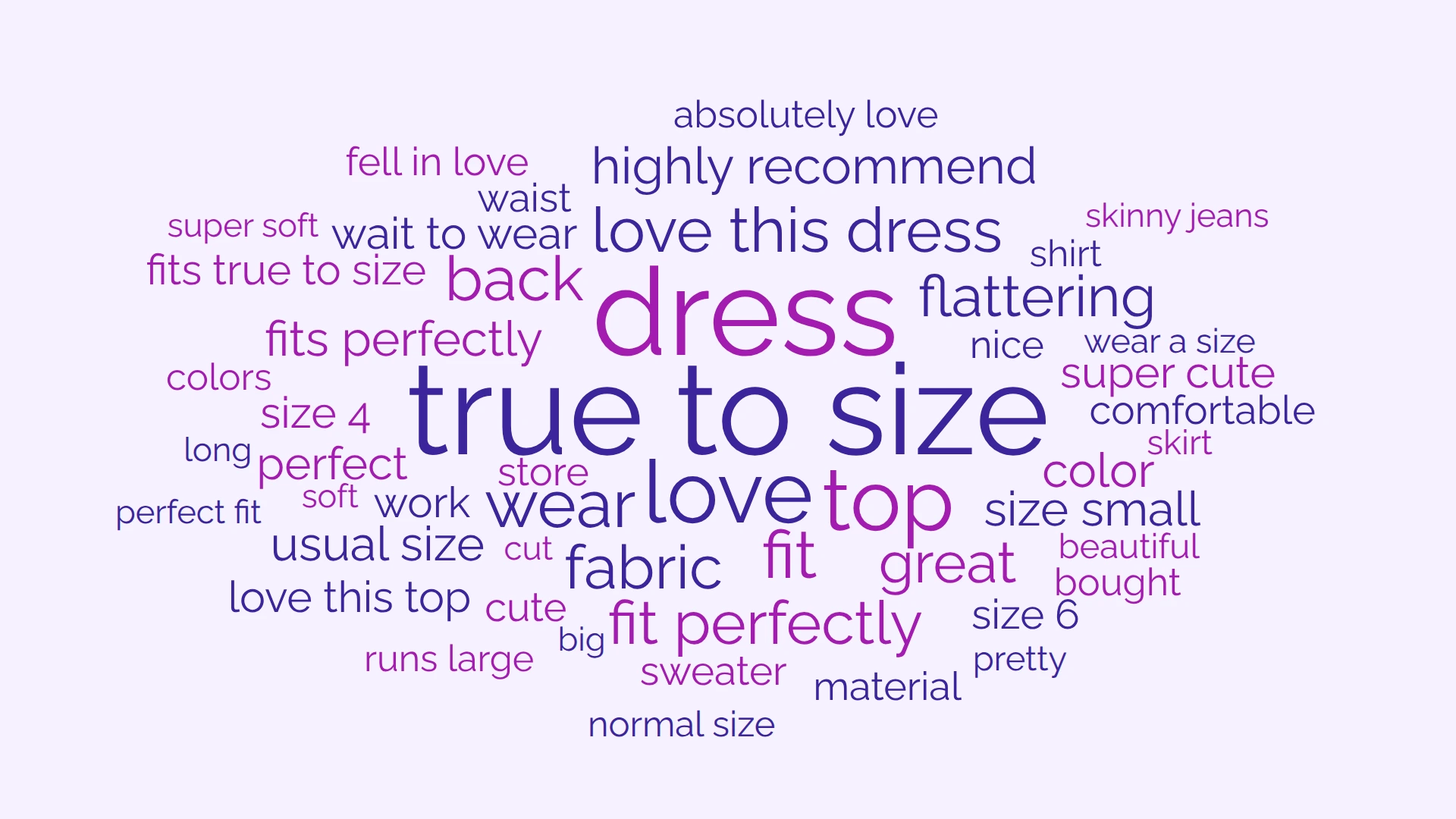
Example: a word cloud with phrases from 2,000 clothing reviews
The ranking behind the cloud
This is the top of the Summary table for the cloud above, exactly as the editor reports it. Phrases and single words sit in one list and are sized by one score.
| Term | Score |
|---|---|
| dress | 556 |
| love | 409 |
| top | 383 |
| fit | 337 |
| true to size | 330 |
| wear | 317 |
| fabric | 257 |
| back | 249 |
| great | 240 |
| flattering | 239 |
| love this dress | 235 |
| size | 229 |
| color | 211 |
| fits perfectly | 190 |
| fit perfectly | 185 |
| highly recommend | 185 |
A three-word phrase ranks with the top words.
“true to size” is one of the five largest terms from 2,000 reviews, ahead of single words such as “wear”, “fabric” and even “size”, the word inside it. “to” is a stop word, but a three-word phrase is allowed one stop word in the middle by default, so the phrase reviewers actually write is the one you see.
Four words survive too.
“fits true to size” is in the same list, further down. Phrases go up to four words; that is where WordCloud+ stops.
Nothing is counted twice.
With the default Combination Counting scoring, every occurrence of “love this dress” is taken away from “love” and “dress” before the phrase gets its own score, so a phrase cannot inflate the words inside it.
Why most word clouds split your phrases
A classic word cloud counts one word at a time. “customer service” becomes “customer” and “service”, “waiting time” becomes “waiting” and “time”, and the big words in the cloud end up being the ones that appear in every sentence rather than the ideas people repeat. You end up staring at “great”, “love” and “good” and learning nothing.
A phrase cloud keeps those words together. When fifty reviewers write “runs large”, WordCloud+ shows “runs large” once, at a size that reflects fifty people saying it. The single words are still there for ideas that really are one word, such as “fabric” or “flattering”.
The difference matters most for open-ended text: survey comments, product reviews, interview transcripts, support tickets and feedback forms, where a phrase is the unit of meaning and a single word on its own can be ambiguous.
Single-word clouds
- customer
- service
- true
- size
- large
WordCloud+
- customer service
- true to size
- runs large
How to make a word cloud with phrases
- 1
Paste your text. Open the online word cloud generator and paste your text, or choose a .txt or .md file (up to 1 MB and 50,000 words). Put each response or comment on its own line: phrases are found inside a line, never across a line break, full stop, comma, question mark or exclamation mark.
- 2
Preview the phrases. The cloud is built in your browser straight away, with phrases of up to four words switched on by default. There is no phrase mode to enable.
- 3
Sign up free to open the editor. A free account lets you save the project, choose the scoring method, edit the stop words and change the styling. Guests can preview but not export.
- 4
Keep any phrase together yourself. If a phrase you care about appears only once, use the Replace tab: Find "net promoter score", Replace "net-promoter-score". The hyphenated form is counted as one term wherever it occurs. If people write the phrase with a comma in the middle, put the comma in the Find text too ("quick, easy" to "quick-easy"); replacements run before the text is split into passages, so the joined form survives.
- 5
Style and export. Pick from 22 fonts, set colours, drag phrases into place in Rearrange mode, then export as PNG, JPEG or SVG at up to 3840 x 2160. Free exports carry a small watermark; the Summary table downloads as a CSV with no watermark on every plan.
A fuller walkthrough of the settings is in the help article: Word clouds with phrases, not just single words.
What counts as a phrase
WordCloud+ treats a run of two, three or four adjacent words as a phrase when:
- It occurs at least twice. A single word counts from its first use; a multi-word phrase has to repeat before it is treated as one.
- The words sit next to each other in the same passage. Text is split into passages at line breaks, commas, full stops, question marks and exclamation marks.
- It does not start or end with a stop word, so "the service" is never a phrase but "customer service" can be.
- It has no more stop words inside than you allow. Two-word phrases allow none; three- and four-word phrases allow one by default, which is how "true to size" and "quality of care" get through.
Everything is counted in lower case, so “Customer Service” and “customer service” are the same term, and the longest phrase is four words. The exact rules and the settings that tune them are in the help article: How phrases are detected.
Phrases are scored, not just counted
If every phrase were sized by raw frequency, single words would win every time: one review saying “love this dress” would count towards “love”, “dress” and “love this dress”, and the single words would swamp the phrase. WordCloud+ avoids that.
Combination Counting, the default, takes each occurrence of a longer phrase away from the shorter phrases and single words inside it, so nothing is counted twice. It then gives a phrase a bonus for each of its words that also appears as a term on its own, which lets a meaningful phrase stand out from the words it is made of. The Weighting slider (0 to 5, default 2) controls how big that bonus is; at 0 it behaves exactly like Deductions.
Prefer something simpler? Choose Deductions for the same double-count removal with no bonus, or Frequency for plain counts, where one occurrence of “customer service” counts towards “customer”, “service” and “customer service” alike and single words tend to dominate. With Combination Counting or Deductions, the Analysis tab shows the Score Transfers behind each term, so you can see exactly why a phrase is the size it is. No model guesses which words belong together: it is deterministic counting, so the same text gives the same cloud every time.
Word clouds from sentences and survey responses
Searching for a word cloud with sentences? A whole sentence is rarely repeated word for word, so WordCloud+ does not try to draw sentences; it draws the phrases inside them that people repeat. Three habits get the best results:
One response per line.
Each line is treated as its own passage, so a phrase in one answer is never joined to the start of the next. A phrase never bridges a full stop either: “great fit. Terrible colour” will never produce “fit terrible”.
Force a phrase when you need it.
A product name, a slogan or a phrase that people write with a comma in the middle can be kept together from the Replace tab by joining it with hyphens (include the comma in the Find text). The same tab merges different wordings of one idea (“fit perfectly”, “fits perfectly”) into a single term, or drops a phrase entirely by replacing it with nothing.
Tune the stop words.
Stop words shape phrases: a phrase never starts or ends with one, and each word has a stop-word switch in its own panel. Default lists exist for 36 Latin-alphabet languages, detected when you create a project, and over 50 stop word lists are available in all. Phrases are only found in Latin-script text.
How to combine and rename words How to remove words from a word cloud
Check every phrase against the text
A phrase in the cloud is only useful if you can see where it came from. Click any phrase to open the phrase panel: References lists every passage it appears in, with the phrase in bold, and Edit lets you change its colour, font, bold or underline, or mark a word as a stop word on the spot. Rearrange mode lets you drag a phrase to a fixed spot that survives rebuilds.
The Summary tab lists every term with two numbers: its Score, which is what sizes it in the cloud, and its Occurrences, the raw number of times it was found. Download saves that table as a CSV file so the numbers can go into a report. The CSV is free and carries no watermark.
Phrase detection, scoring and export are on the Free plan
- Phrases of up to four words, with every scoring method and the Weighting slider
- Stop words with default lists for 36 Latin-alphabet languages, plus your own
- Find-and-replace to merge spellings or force a phrase together
- References for every phrase: each passage it came from, phrase in bold
- Per-phrase colour, font, bold and underline; multiselect; drag-to-position
- 22 fonts, custom colour schemes, 2 to 200 terms
- PNG, JPEG and SVG export from 240 x 240 up to 3840 x 2160 (watermarked on Free), CSV of the ranked terms
- No limit on projects, kept on your own device
All of it is on the Free plan at $0. Free exports carry a small “Not for commercial use” watermark; the cloud, the phrases and the resolution are the same on every plan.
Need a clean export for one report? Per Export removes the watermark from a single project for $3.50, with no subscription. That project's source text is then locked, while styling and re-export stay open.
For regular use, Premium at $7.00 a month gives watermark-free exports, encrypted CloudSync backup to Google Drive (beta) and Coding for tagging phrases into themes, with a 30-day free trial (a card is taken at checkout and the first charge lands when the trial ends).
Questions about word clouds with phrases
- Is the phrase cloud generator free?
- Yes. The preview needs no account, and a free account adds saving, settings, styling and export with a watermark, with no limit on projects. Watermark-free exports are $3.50 for one project or part of Premium at $7.00 a month.
- What does the watermark look like?
- A faint, tiled line of text reading "https://wordcloudplus.com - Not for commercial use" at 20% opacity across the image. The cloud, the phrases and the export size (up to 3840 x 2160 as PNG, JPEG or SVG) are identical on every plan.
- Is my text uploaded anywhere?
- No. Phrases are found, scored and drawn in your browser, and your projects are stored on your own device. Your text itself is never sent: the app fetches stop word lists and fonts over the network, and our analytics receive counts (how many words and lines), never the text. Text leaves your browser only if you turn on Premium CloudSync, and then it is encrypted before it is saved to your own Google Drive.
- Does it work in other languages?
- Phrases are found in any language written in the Latin alphabet, accents included, with default stop word lists for 36 of them and over 50 lists in all. Text written entirely in scripts such as Cyrillic, Arabic or Chinese does not produce terms yet. See Making a word cloud in another language.
- Do I need an account?
- Not to see your phrases: the preview from the generator on the home page needs no sign-up. A free account is needed to save the project, change fonts and colours, edit stop words and replacements, drag terms around and export.
- Why is a phrase I expected missing?
- The usual reasons are that it appears only once, that a comma, full stop or line break sits inside it, that it starts or ends with a stop word, or that it is longer than four words. Fix a once-only phrase, or one broken by a comma or full stop, with a hyphenated replacement in the Replace tab (put the comma or full stop in the Find text); put each response on one line to avoid line breaks inside phrases; and edit the stop word list for the third.
- How long can a phrase be?
- Up to four words. WordCloud+ looks for two-, three- and four-word phrases as well as single words and ranks them all together; nothing longer than four words is extracted.
- Does it use AI to find phrases?
- No. Phrases are found by counting runs of adjacent words and scored with a deterministic method you can inspect in the Score Transfers panel. The same text always gives the same cloud.
- Can I add a phrase that is not in my text?
- No. Every term comes from the text you paste. You can merge or rename terms with Replace, remove them with stop words, or edit the text itself. If a phrase occurs only once and you still want it in the cloud, join it with hyphens in the Replace tab and it is counted as one term.
- Can I make phrases bigger than single words?
- Yes. With Combination Counting selected, raise the Weighting slider (0 to 5) in Settings to grow phrases relative to single words. The Frequency method has no bonus and counts each occurrence towards the phrase and every word inside it, so single words tend to dominate.
See the phrases in your own text.
Paste it in and the cloud is built in your browser, with phrases kept together, before you decide whether to sign up.
No credit card for the Free plan. Your text is processed in your browser and is not uploaded.
Go deeper
- How phrases are found and scored
- How to combine and rename words
- Word clouds in other languages
- Example: 2,000 clothing reviews
- Example: A Christmas Carol, where "merry christmas" and "tiny tim" appear as single terms
- Word clouds for the classroom: three lessons with the exact steps
- Word cloud shapes: put the phrases inside a heart, circle or speech bubble
- WordCloud+ vs WordClouds.com
- Coming from the MonkeyLearn word cloud generator? See where each feature went